A week of meals, built around you.
Get AI meal plans and recipe ideas shaped by your goals, preferences, pantry and saved recipes.
Your everyday vegetarian kitchen companion
Set nutrition goals, follow your progress, and bring your recipes, daily and weekly meal plans, pantry and shopping lists together.
Premium adds Ask Herb AI Assistant, meal photos, vegetarian recipe conversion and Product Scan. You review the details and choose what to save.
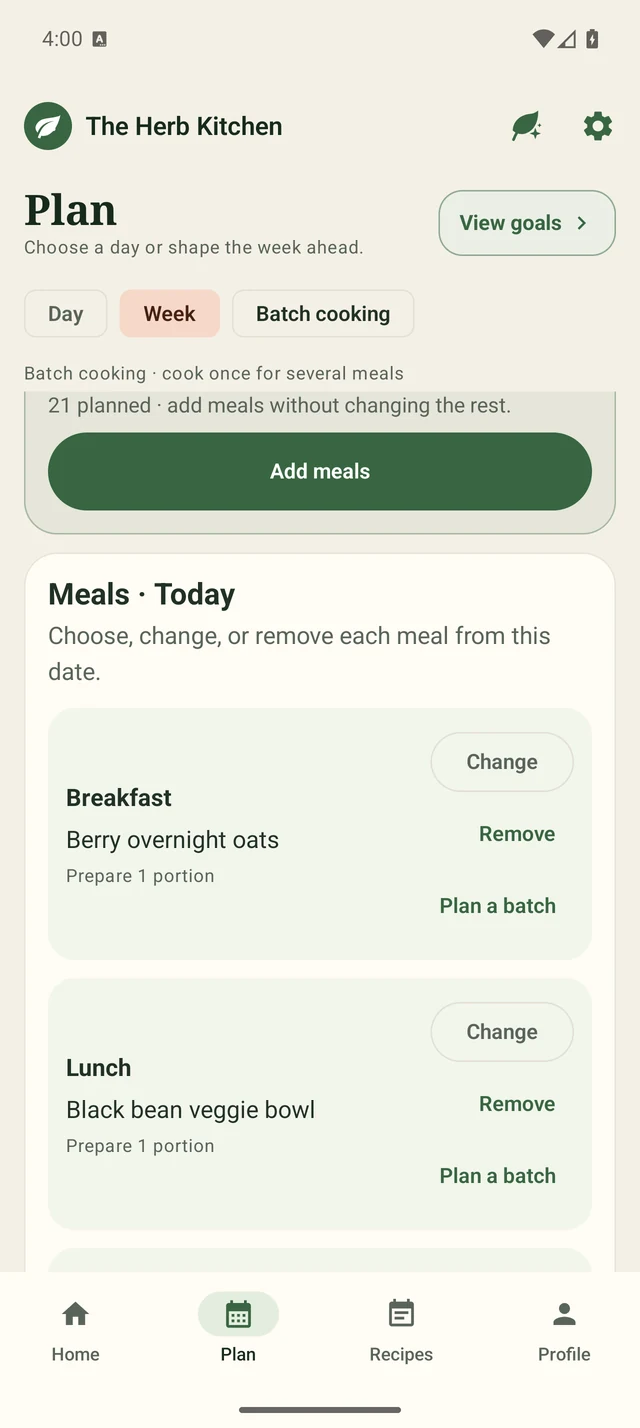
Choose recipes, plan portions and make room for leftovers.
02 · Pantry managementKnow what you have.Keep ingredients, quantities and use-soon dates in view.
03 · Shopping listsBring a useful list.Connect what you plan to cook with what you need to buy.
04 · Goals & nutritionFollow your progress.See how logged and planned meals add up against your goals.
Come to the table early
Join the early-access list for our US Android and iPhone alpha. We review each request before sending tester invitations for your selected platforms.
Your address is used for early-access setup and access updates. We do not sell it.Start with your everyday routine
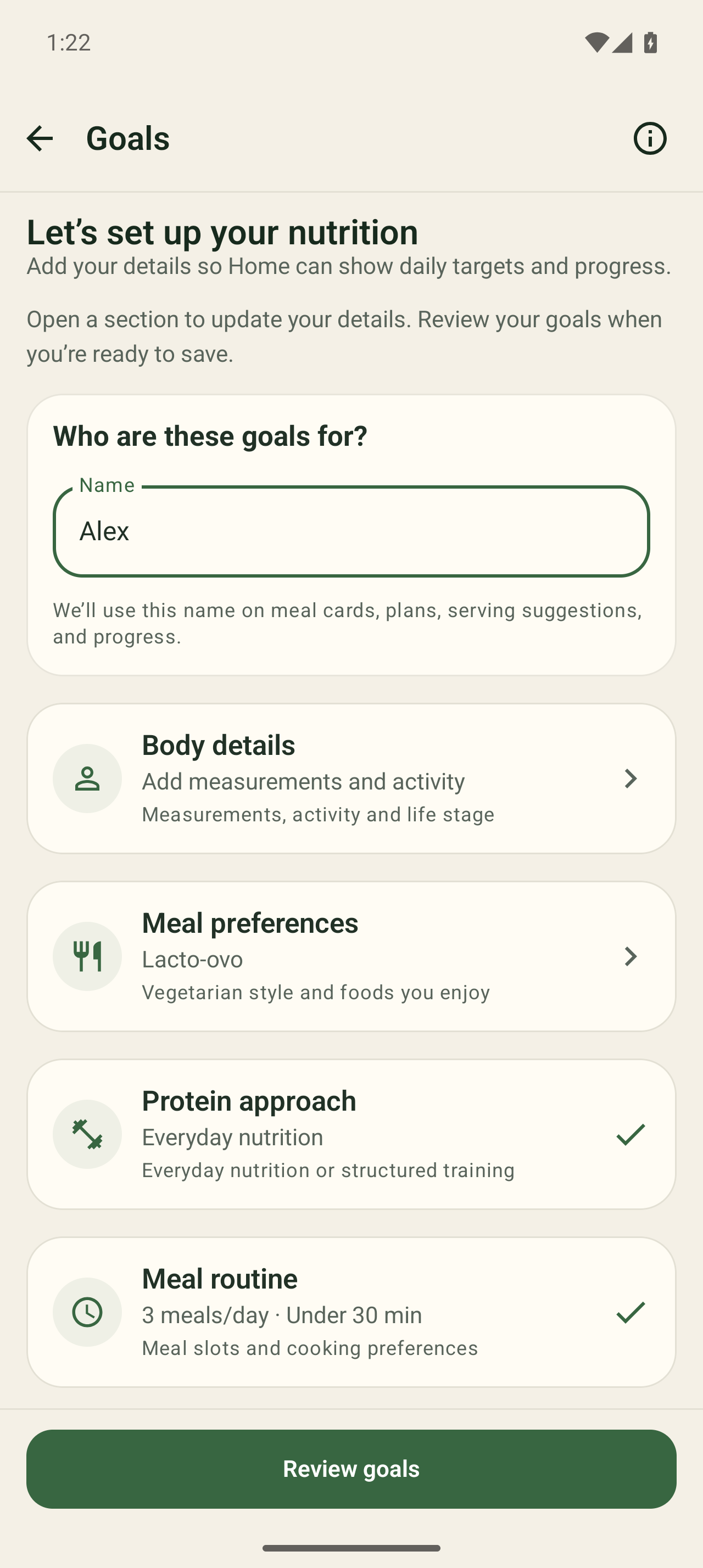
Give your food routine a direction, then keep track of what you actually eat. Your goals, meals and daily progress belong together.
Choose your dietary preferences and review your daily nutrition targets. Pro adds custom nutrition targets.
Add the foods you ate, check the portions and record your meals, snacks and drinks. Premium adds optional photo and description help.
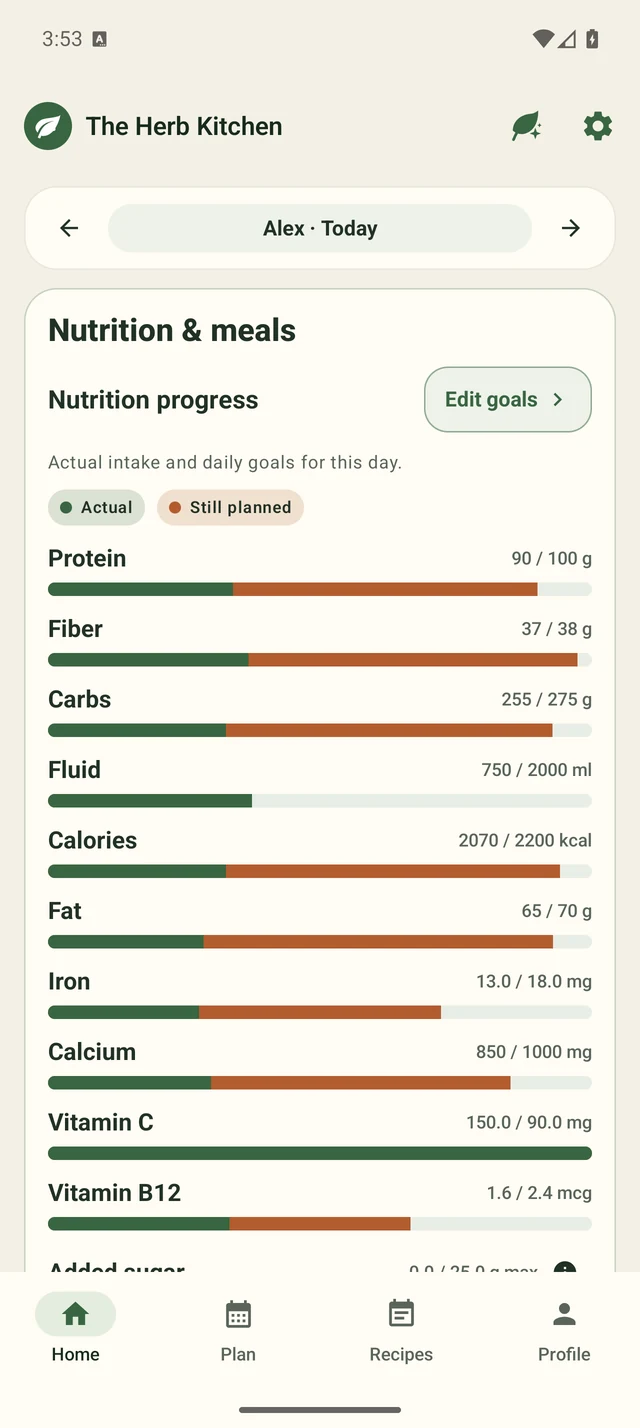
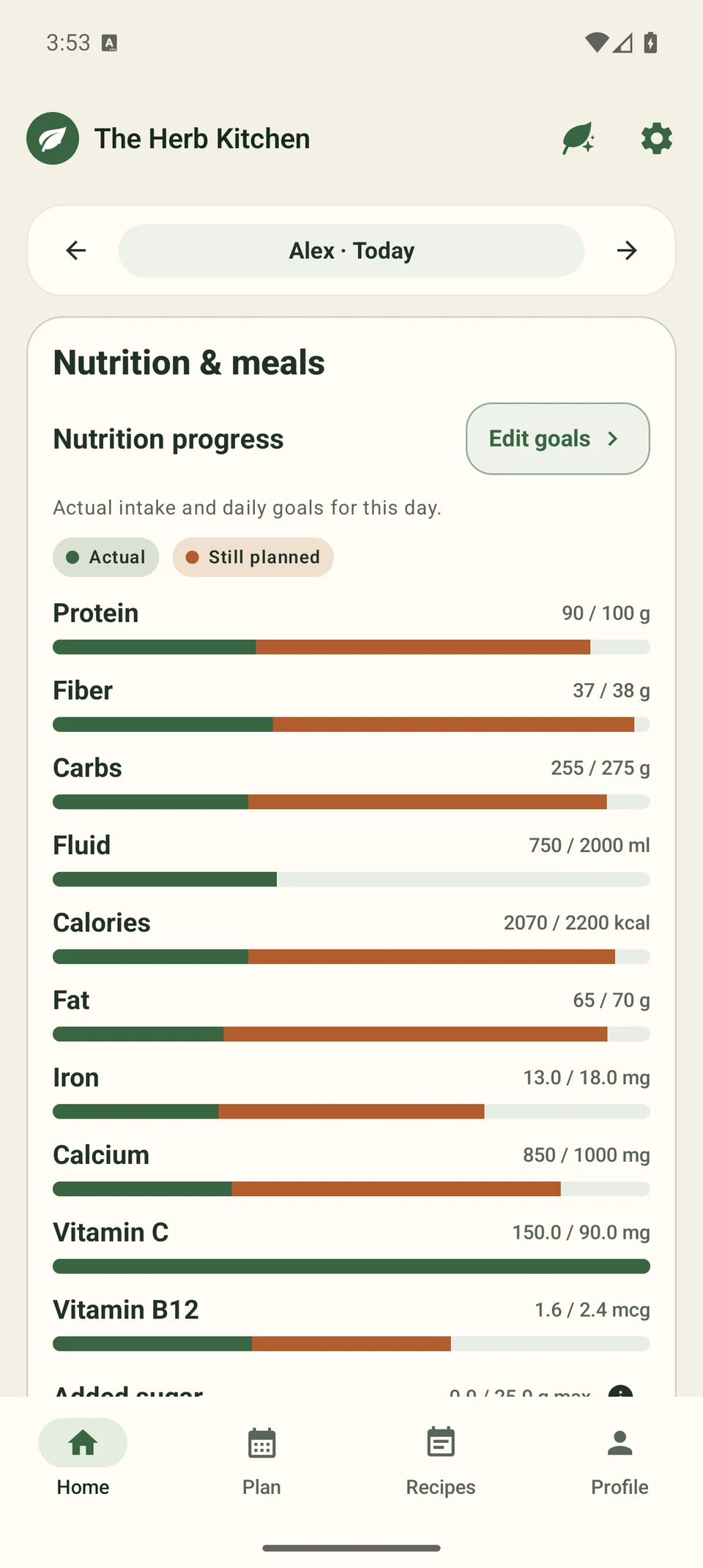
See how energy, protein, fiber and supported vitamins and minerals add up. Logged intake stays distinct from meals you are still planning.
Start with your preferences, body details and daily routine.
See logged intake and still-planned meals against your daily nutrition targets.
Premium AI features
Bring Product Scan, Ask Herb AI Assistant, meal and pantry photos, personalized plans and vegetarian recipe conversion into your kitchen routine. You review the details and choose what to save.
Get AI meal plans and recipe ideas shaped by your goals, preferences, pantry and saved recipes.
Bring in a recipe with meat or seafood. AI suggests vegetarian swaps and rewrites the cooking steps for your choices. Review the ingredients, amounts and method before saving.
Explore ingredient swaps and recipe remix. Recipe importing is also available in Free and Pro; Premium adds AI adaptation.
Nothing changes until you review and confirm it. Nutrition values are estimates, and AI suggestions can be imperfect.
Your kitchen help Premium
Describe your meal, upload a photo or ask what could help with today's nutrition goals. Ask Herb AI Assistant keeps the message, response and review together. You check and edit before saving.
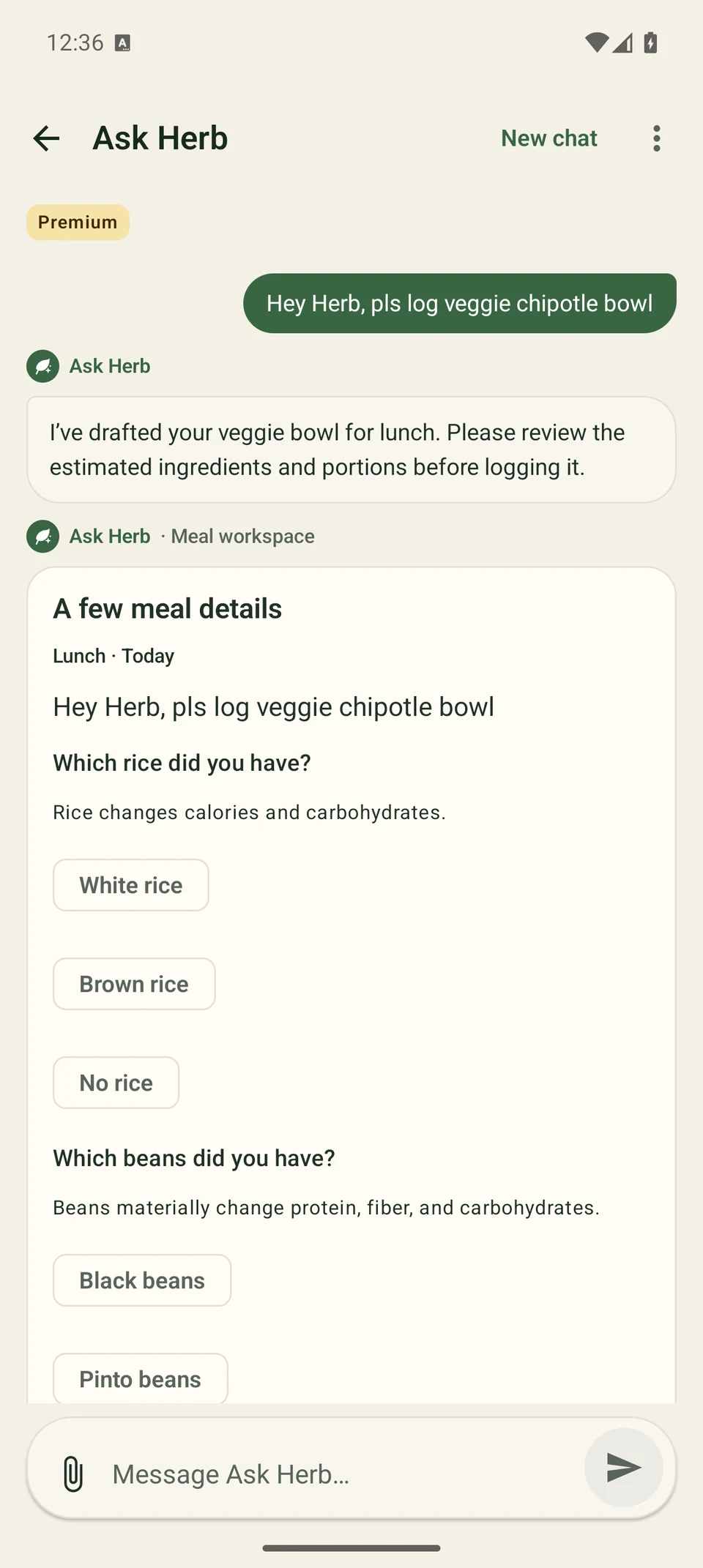
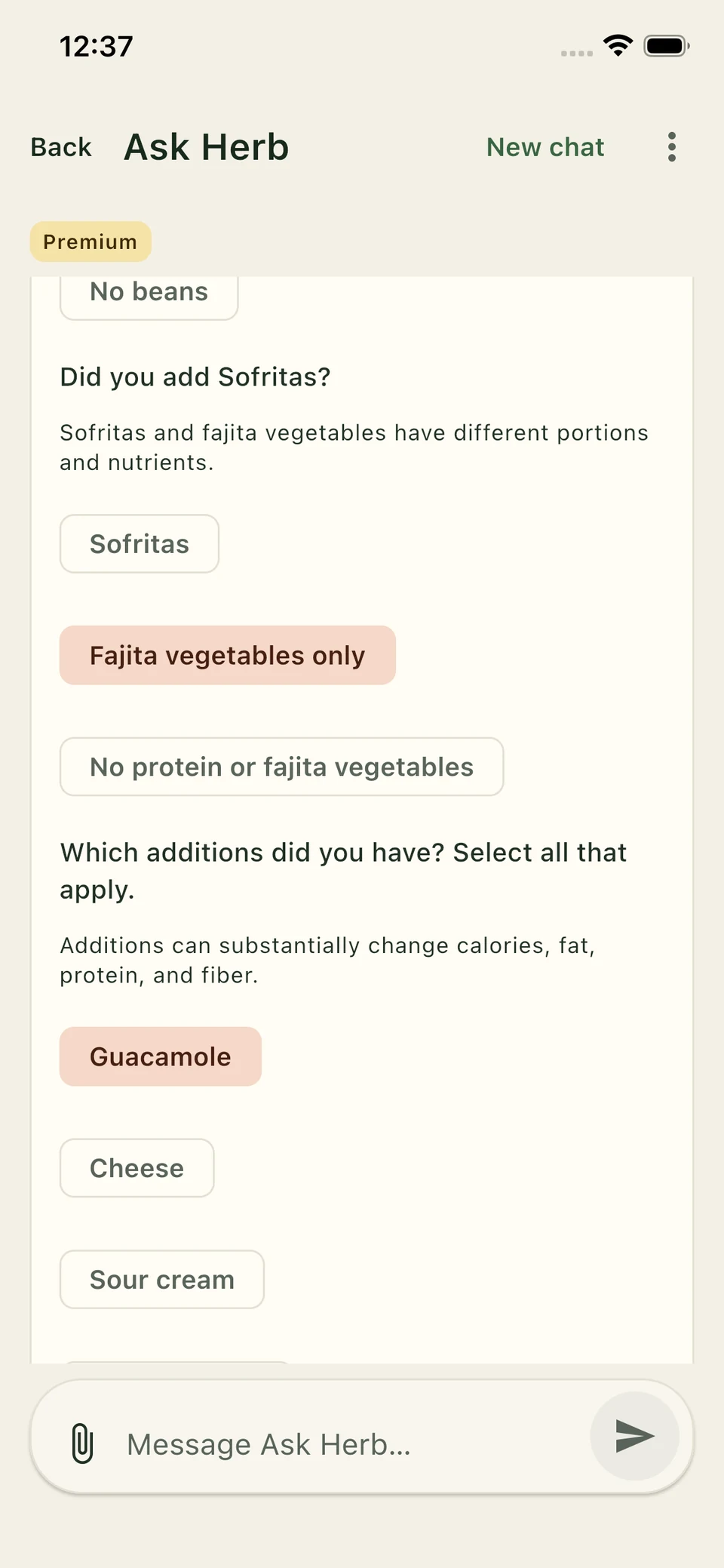
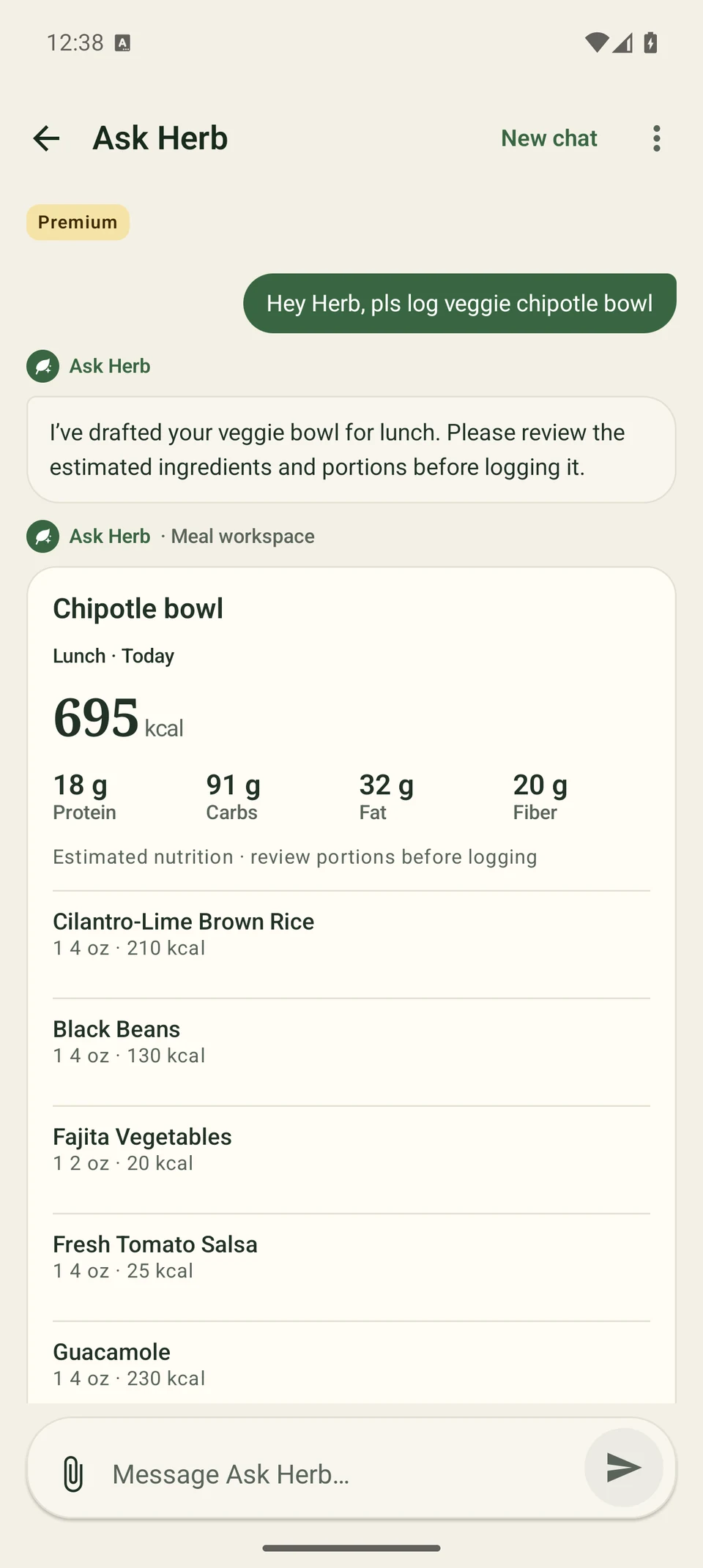
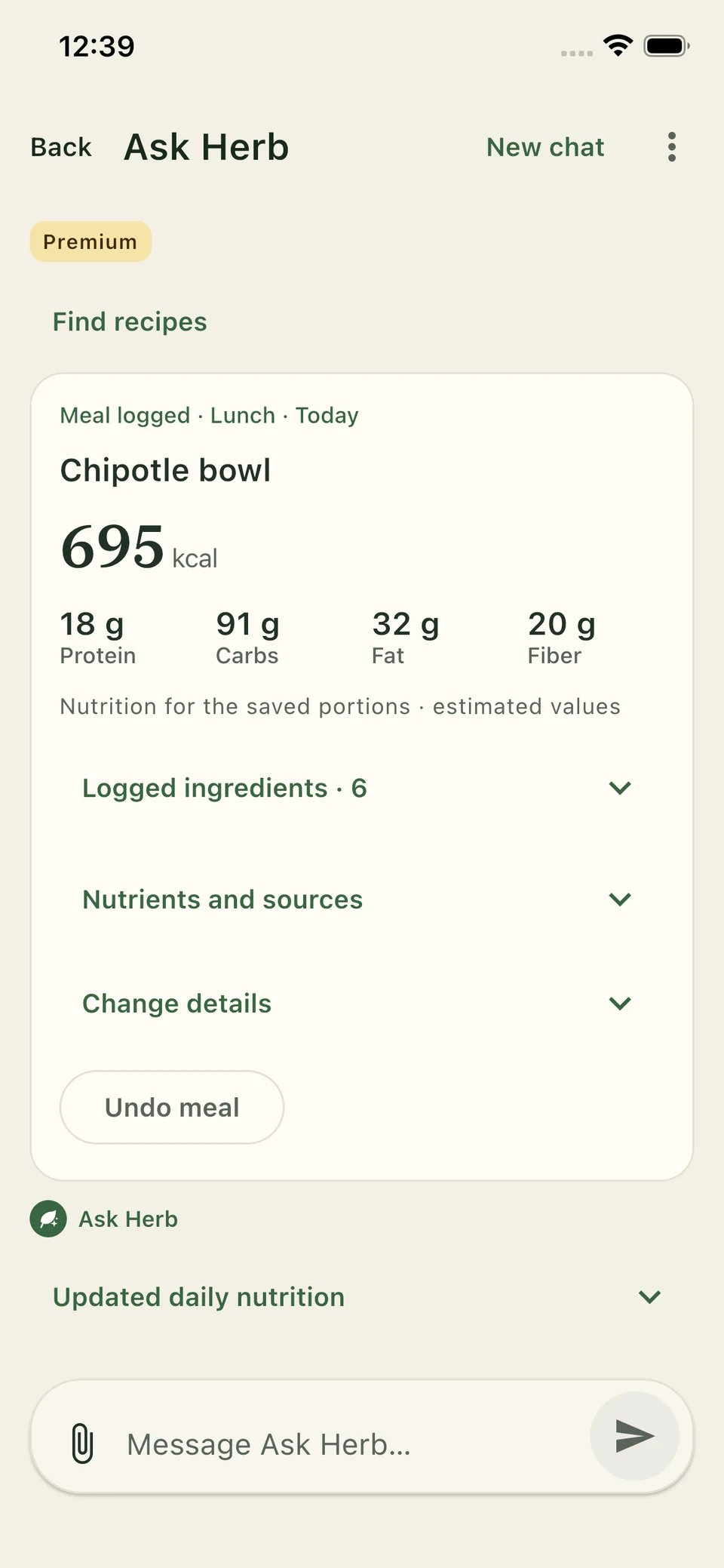
Follow the bowl from request to receipt. Swipe or scroll across all four steps.
“Hey Herb, pls log veggie chipotle bowl” — Ask Herb AI Assistant asks which rice and beans were in your bowl.
Answer the Sofritas question from Ask Herb AI Assistant, then select the additions you ate. Your answers help build the estimate.
Review the ingredients, portions and estimated nutrition. Edit anything that needs changing, then confirm the meal.
After you confirm, Ask Herb AI Assistant shows the meal added to your nutrition log, with an option to undo it.
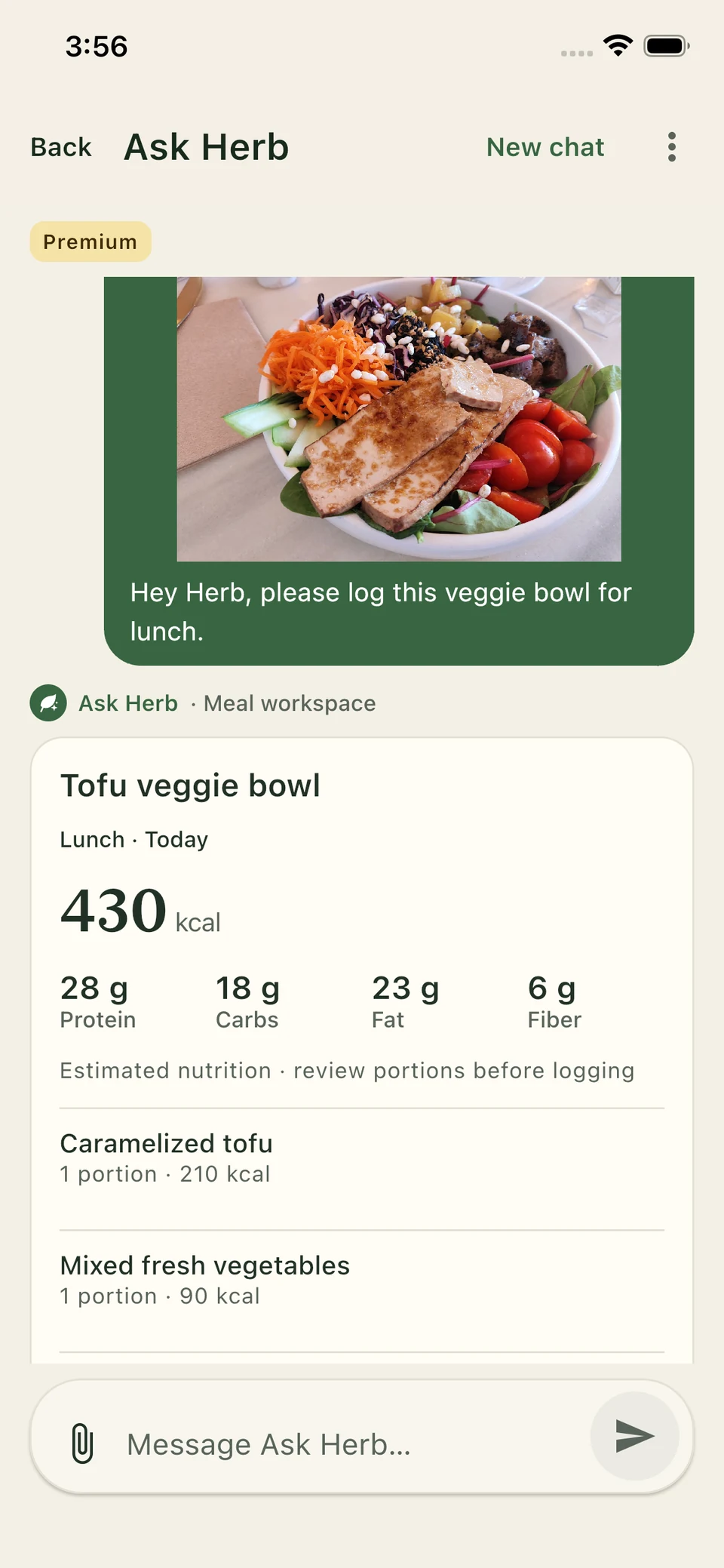
In Ask Herb AI Assistant, your camera or library photo sits above its matching meal review, so you can see what the estimate refers to.
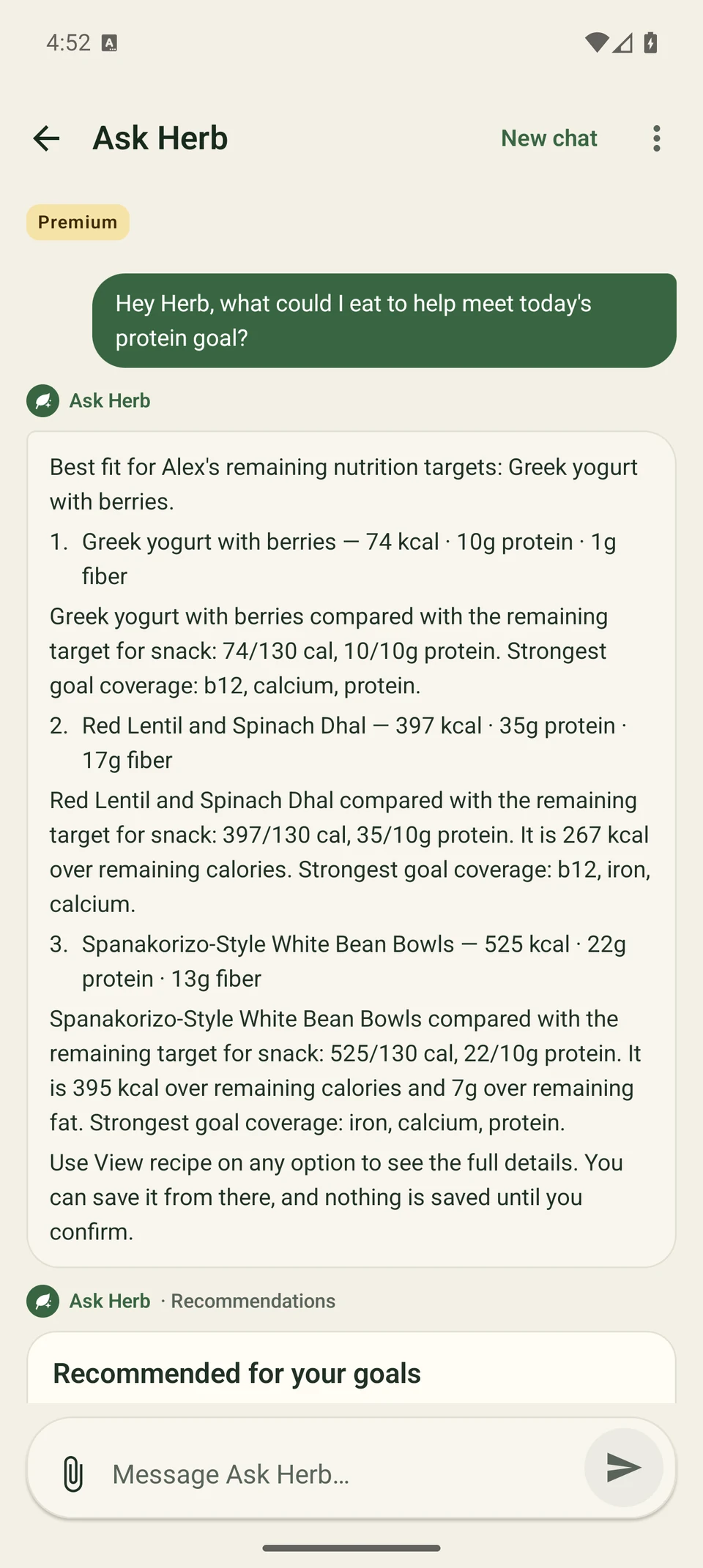
“Hey Herb, what could I eat to help meet today’s protein goal?” Ask Herb AI Assistant suggests ideas in the context of logged and planned meals.
Product Scan Premium
Scan a packaged product's barcode or enter it to review available nutrition and ingredients. See how the ingredient list fits vegetarian, vegan, Jain and other supported preferences, with the reason behind a conflict or uncertainty.
Review the product, labelled serving, available nutrition and product rating together.
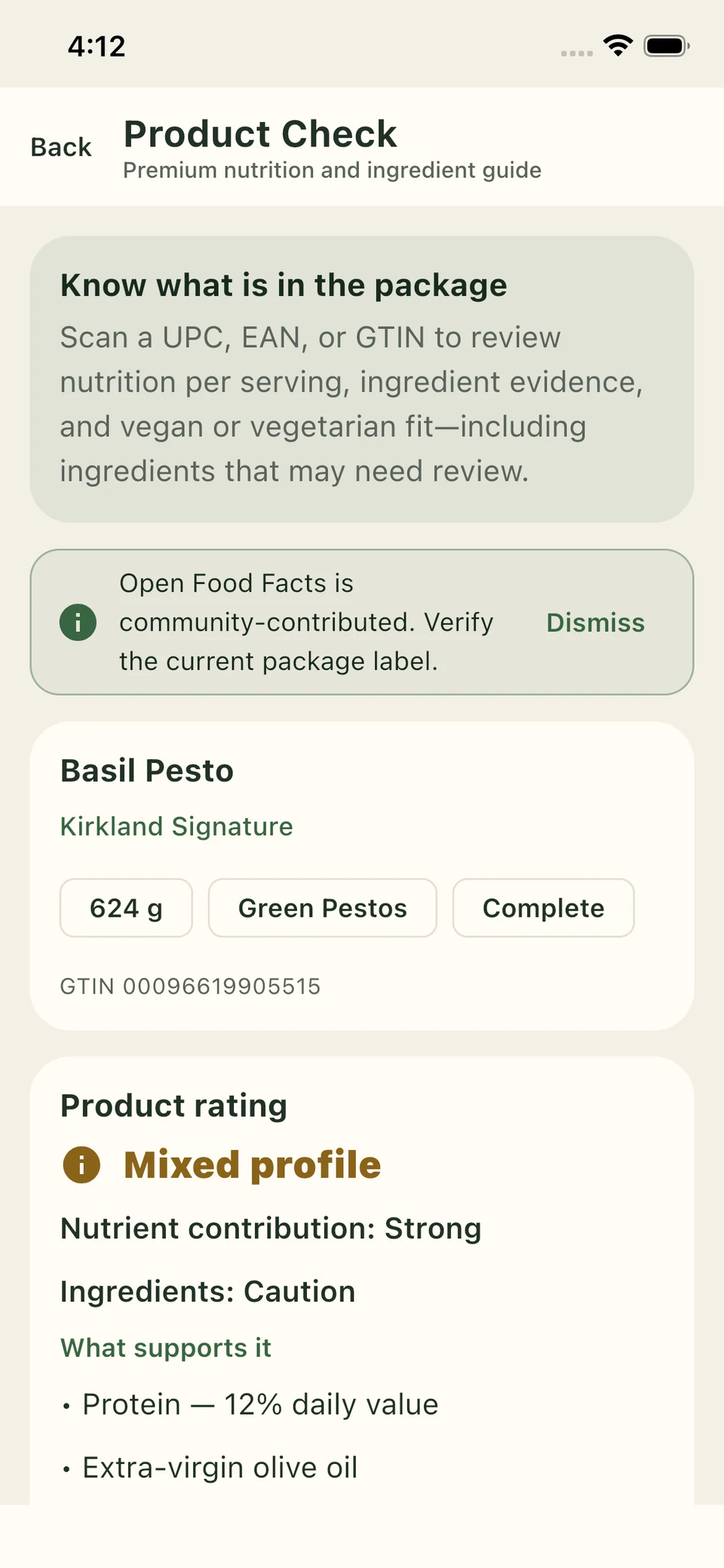
Read each outcome and its ingredient reason. This pesto example flags animal rennet in Pecorino Romano DOP.
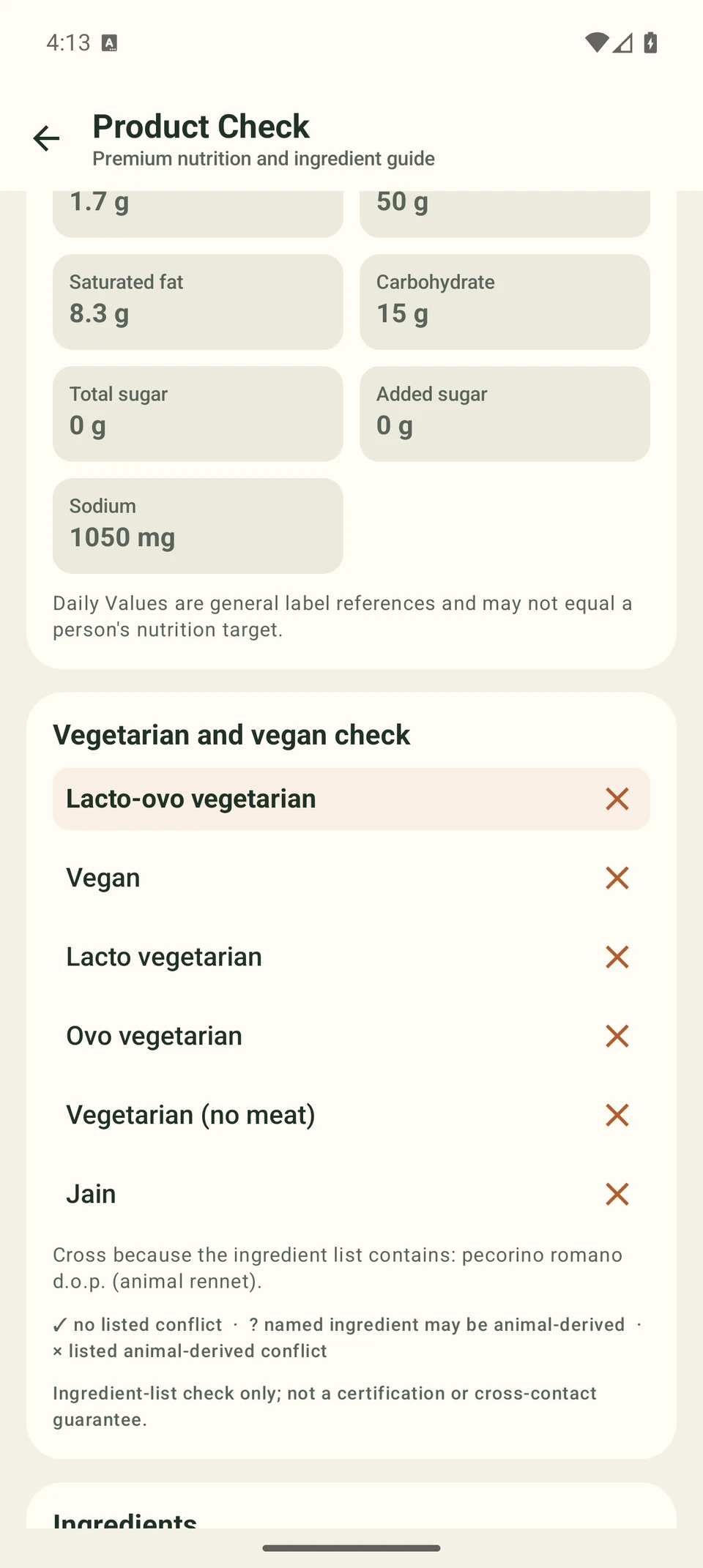
A product rating describes the labelled product. Ingredient checks are not certification or a cross-contact guarantee. Verify the current packaging; some products have incomplete data.
Recipes, plans & shopping
Plan a single day or map out the week. Choose recipes, adjust servings, prepare extra portions and carry your ingredient needs into shopping. Keep meals, pantry stock and your shopping list connected as plans change.
Choose recipes for each day and meal slot. Adjust portions as plans change. Pro adds weekly copy, repeat and bulk tools.
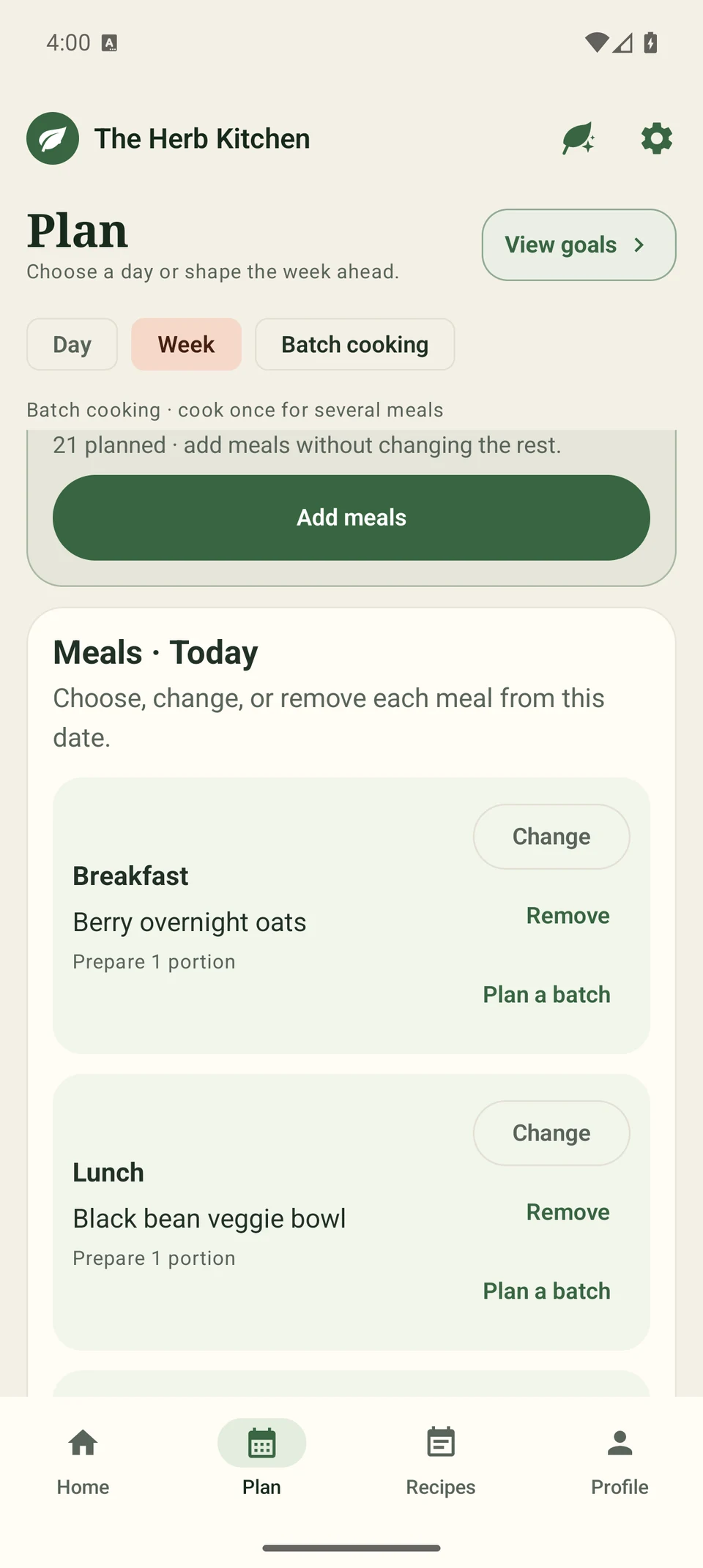
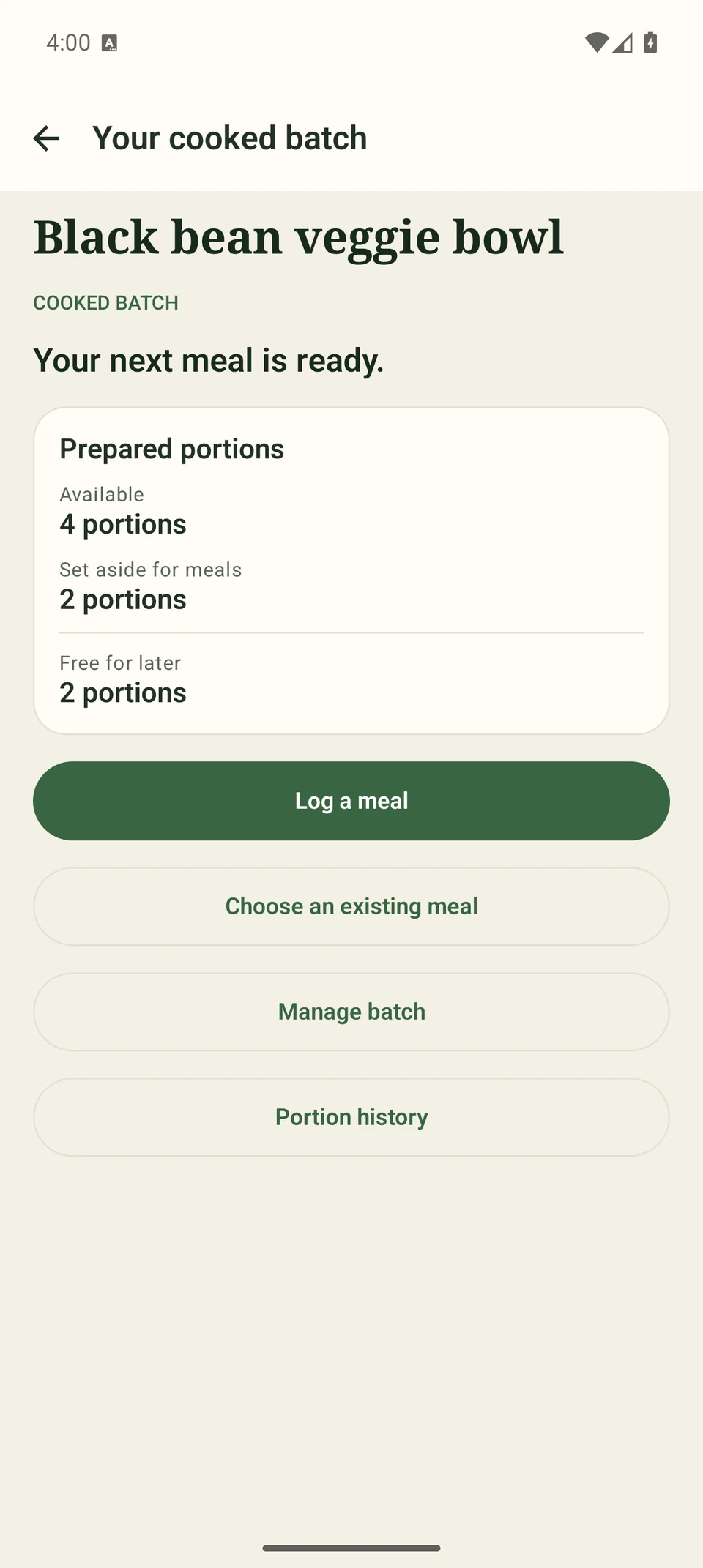
Prepare portions, reserve them for future meals and keep track of what is left.
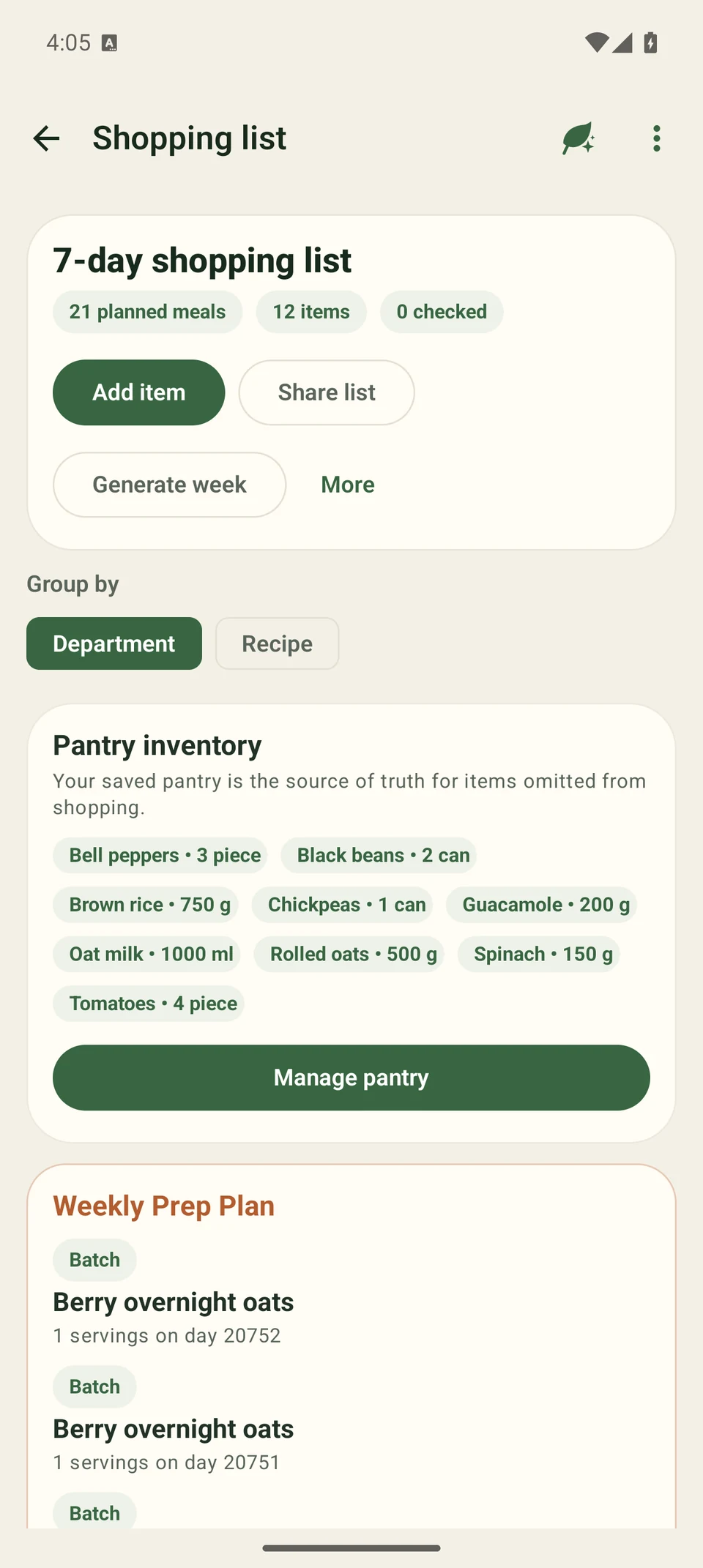
Add items and check them off as you shop. Planned quantities account for portions and pantry stock; Pro adds smart shopping tools.
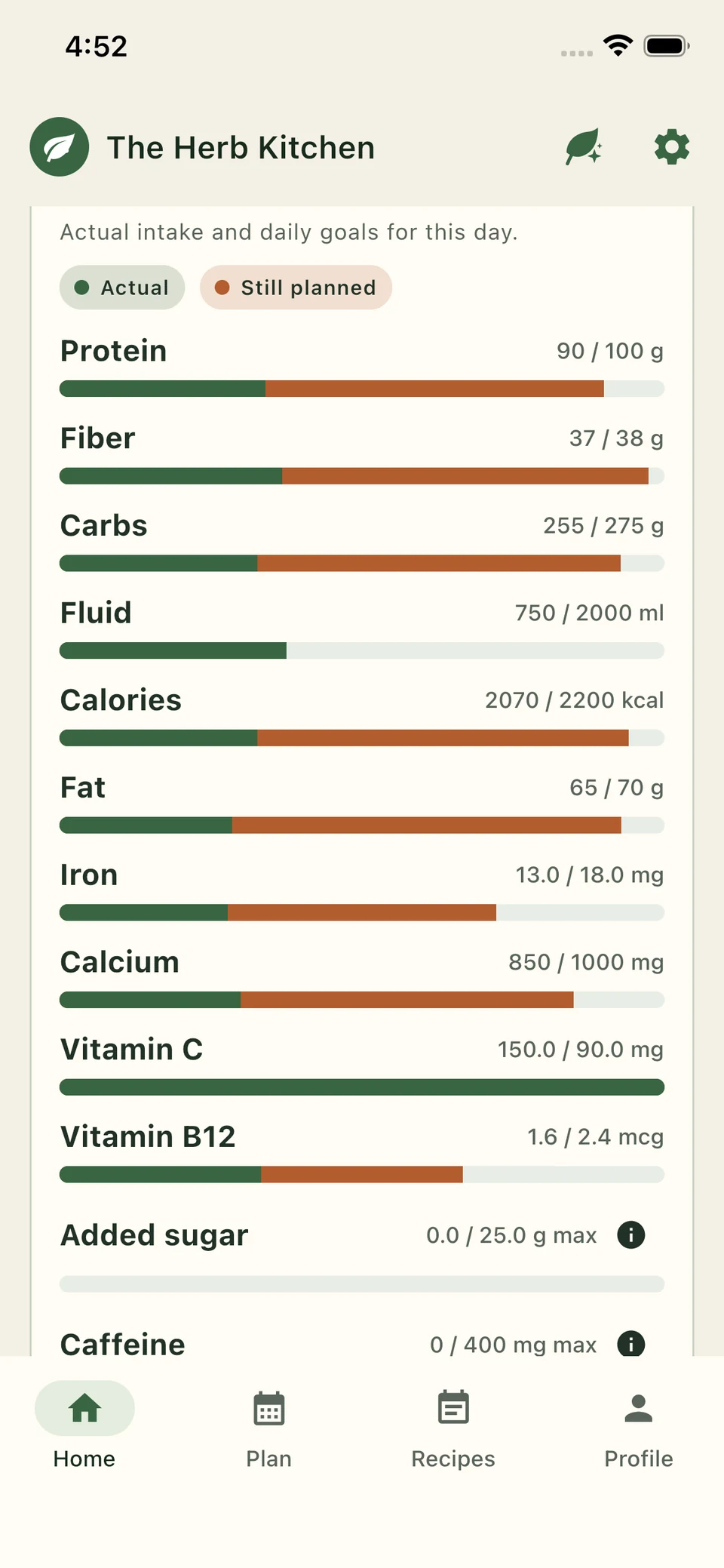
Today at a glance
Start with your nutrition goals and dietary preferences. See logged meals in green and still-planned nutrition in warm orange. Follow energy, protein, fiber and supported vitamins and minerals against your targets. Fluid shows what you have actually logged. Pro adds custom nutrition targets.
No food shaming. Use the information to notice patterns. It is not a personal health score or medical advice.
Protein, fiber, iron, calcium and B12 cards keep the day in view.
Recipe discovery
Browse The Herb Kitchen's curated meat-free recipes, or use Ask Herb AI Assistant to search recipe websites. Capture or import a recipe you want to adapt. Premium AI can suggest vegetarian replacements for meat and seafood and rewrite the cooking steps. Preview your choice, review ingredients and adaptations, then save the version you want to cook.
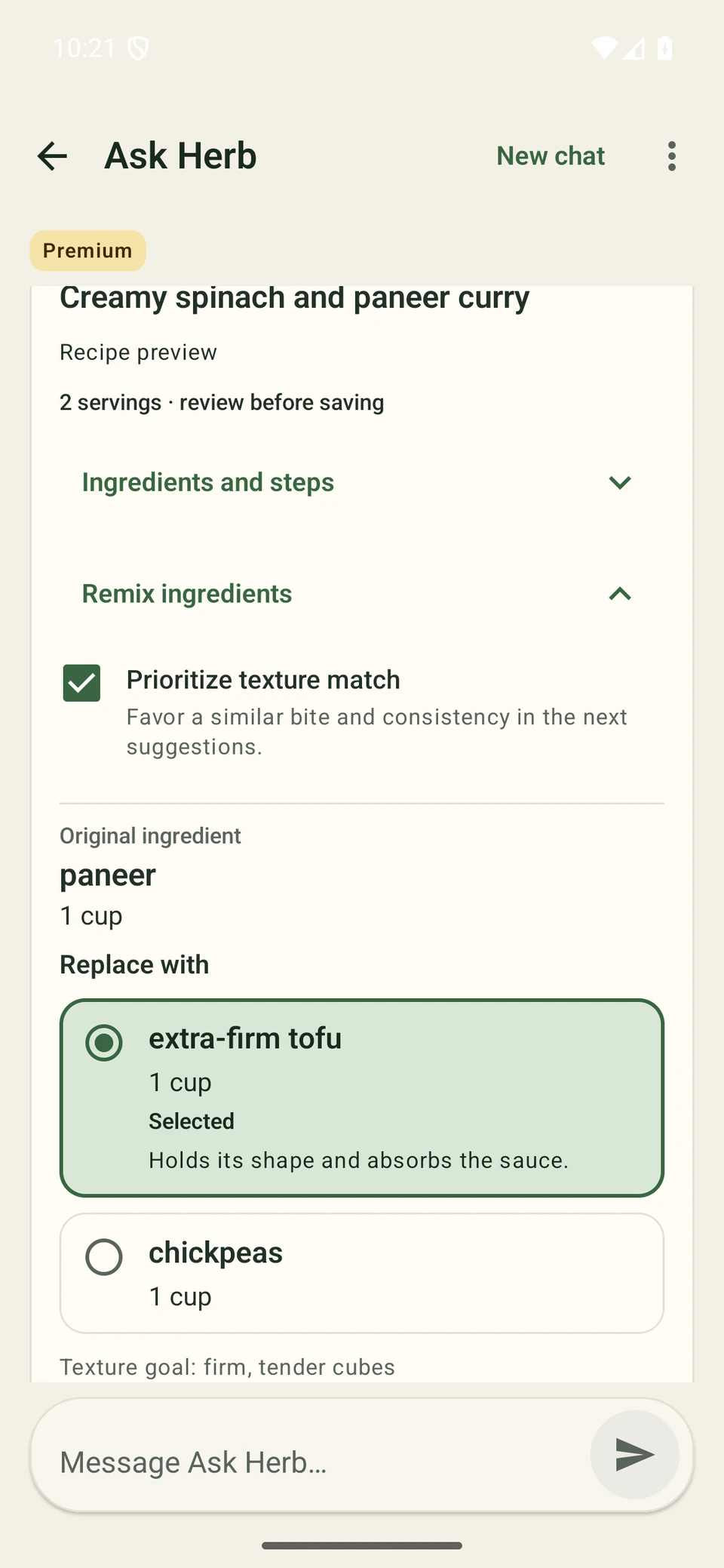
Explore vegetarian and vegan recipes, with servings, ingredients and available nutrition.
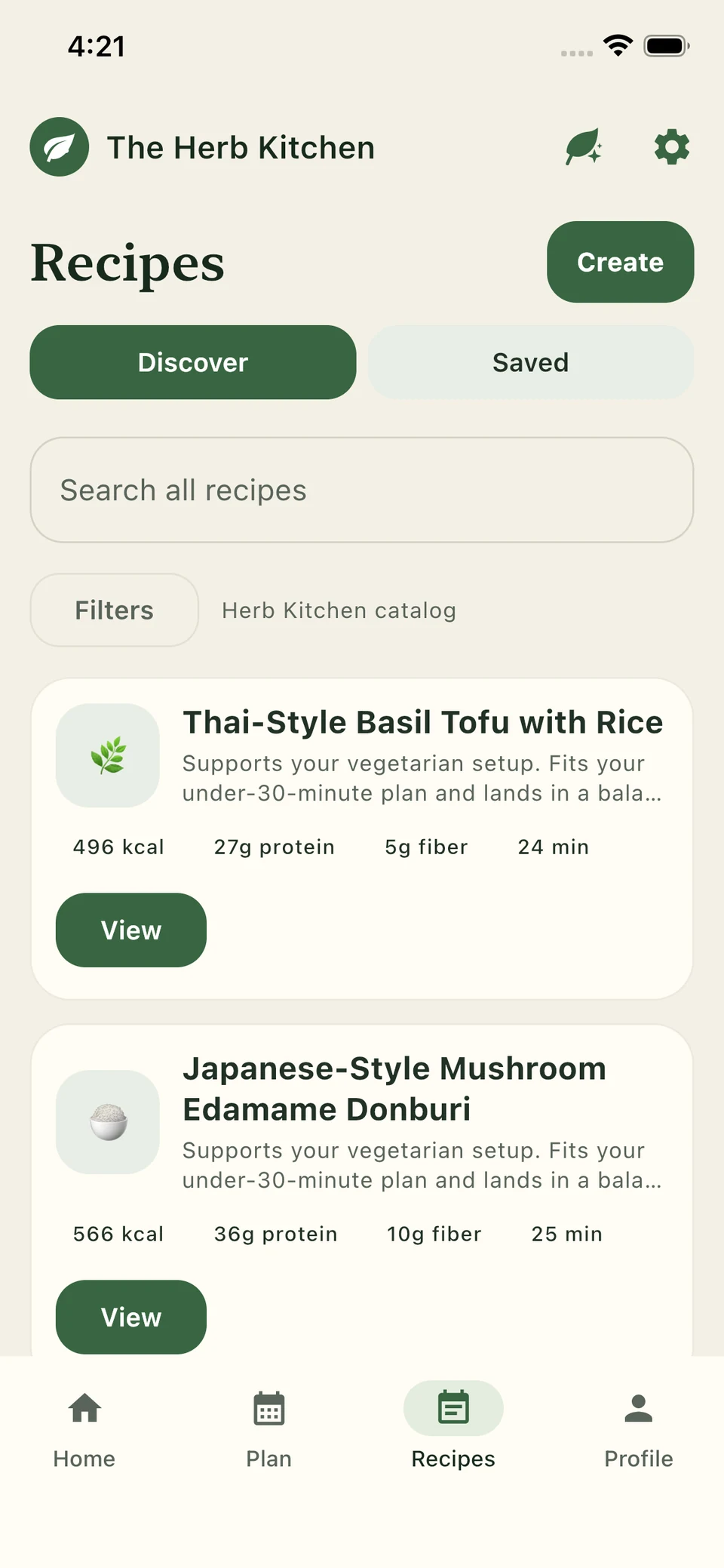
“Hey Herb, find a vegetarian creamy mushroom pasta recipe.” Review the result from Ask Herb AI Assistant with its publisher and ingredients.
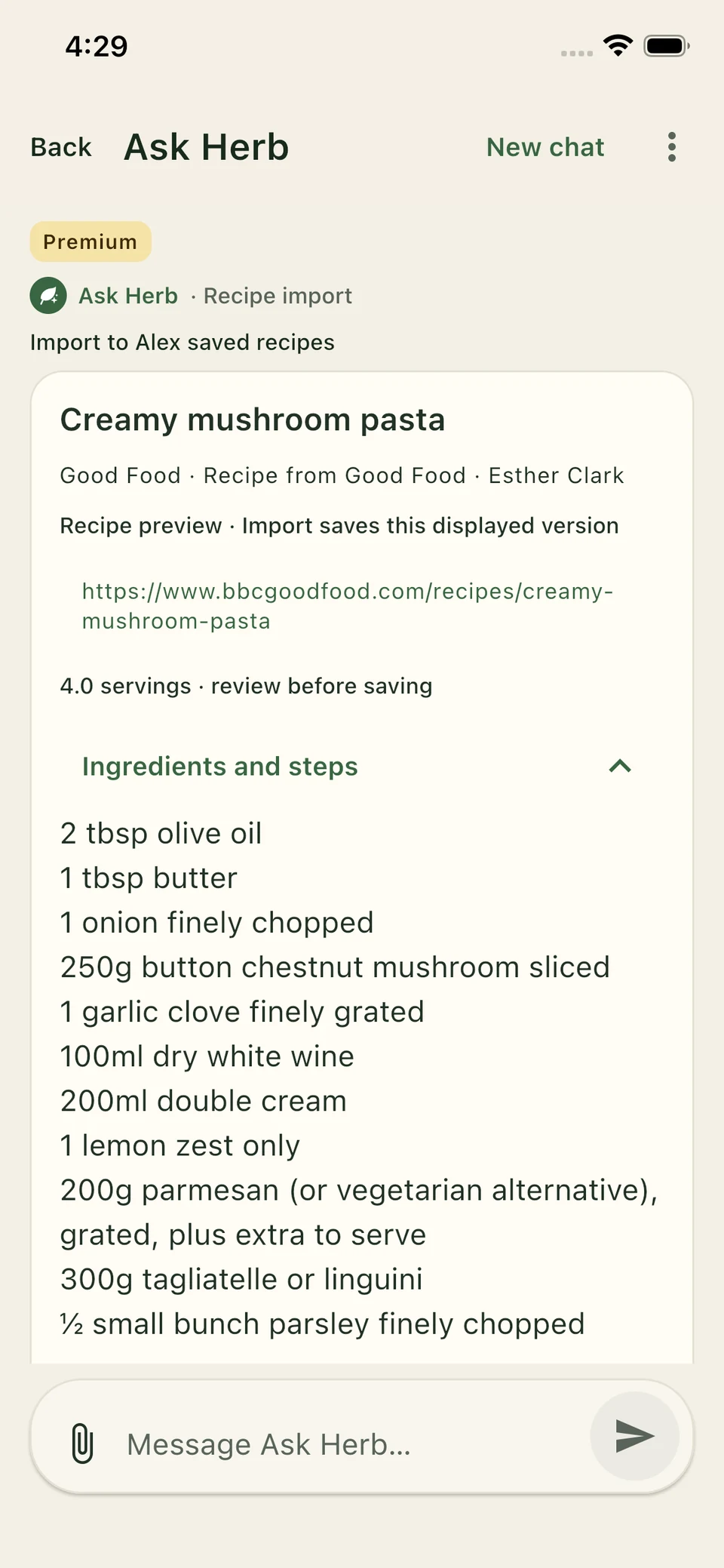
Compare paneer alternatives in an example curry. Review the amount, selected option and cooking guidance before applying your swaps.
Publisher access and readable recipe data can vary. Imported nutrition can be estimated or unavailable. Check dietary ingredients and your chosen substitutions before saving.
Pantry management
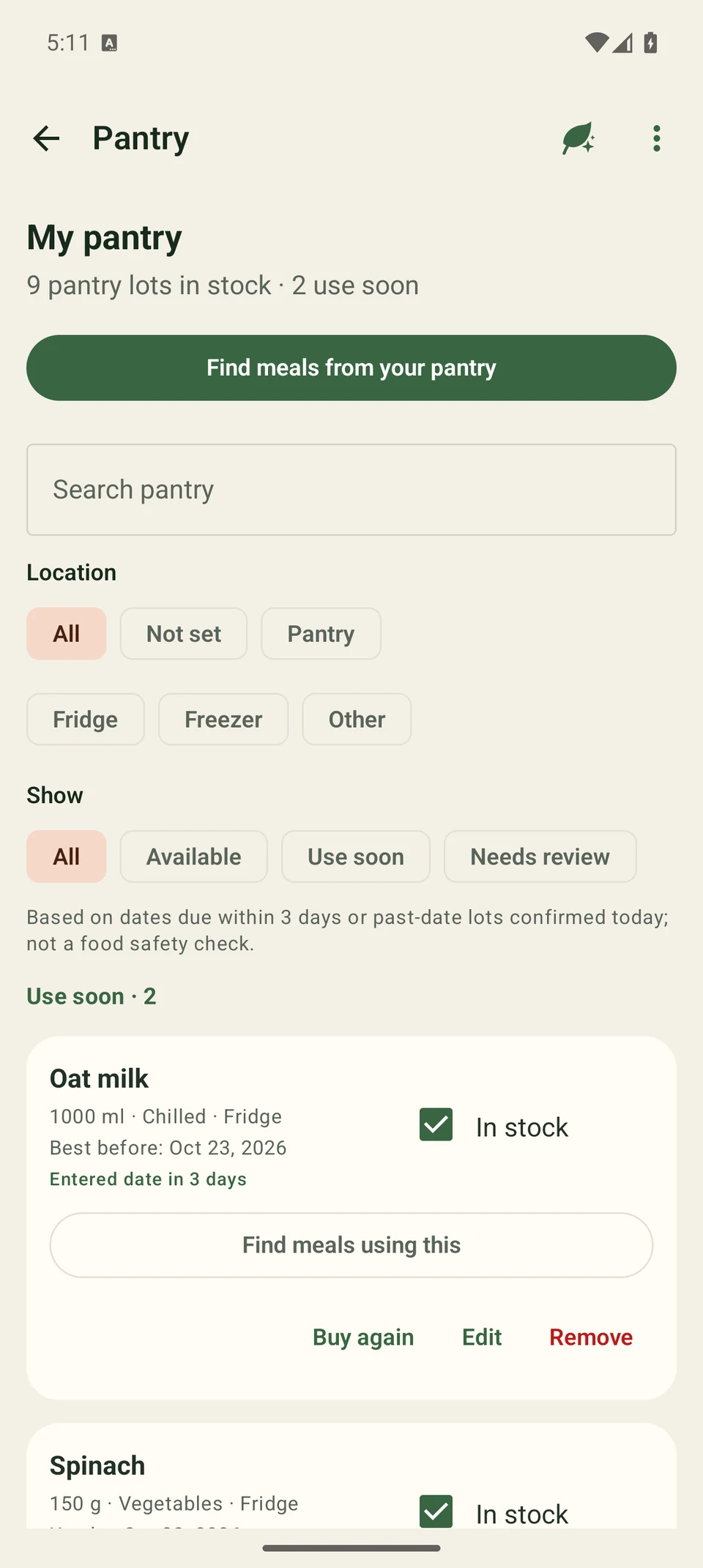
Keep ingredients, quantities, storage locations and use-soon dates in view. Add or edit items manually, then use your stock when planning meals and shopping.
Take a photo of your ingredients or choose one from your library. Review the names and estimated quantities, then add the selected items to Pantry. Leave out anything you do not want to keep.
Choose a picture of the ingredients you have.
Check names, amounts and which items are selected.
Add the reviewed selection, then use your stock when planning and shopping.
Ask Herb AI Assistant keeps the shared photo above its matching Kale and Bell peppers review. Check the details before adding.
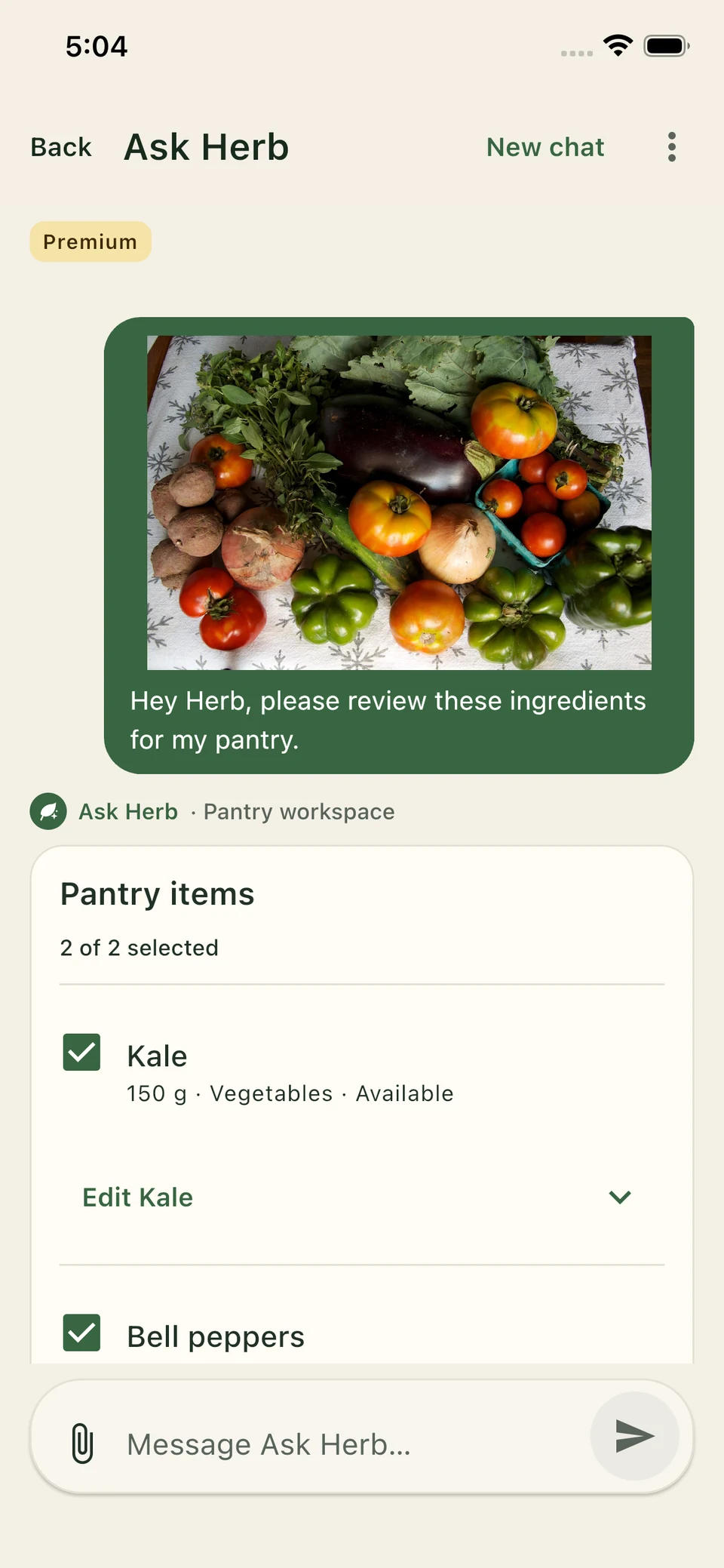
See your ingredient quantities and available stock. Use dates to keep an eye on items you may want to use soon.
Food and drinks belong together
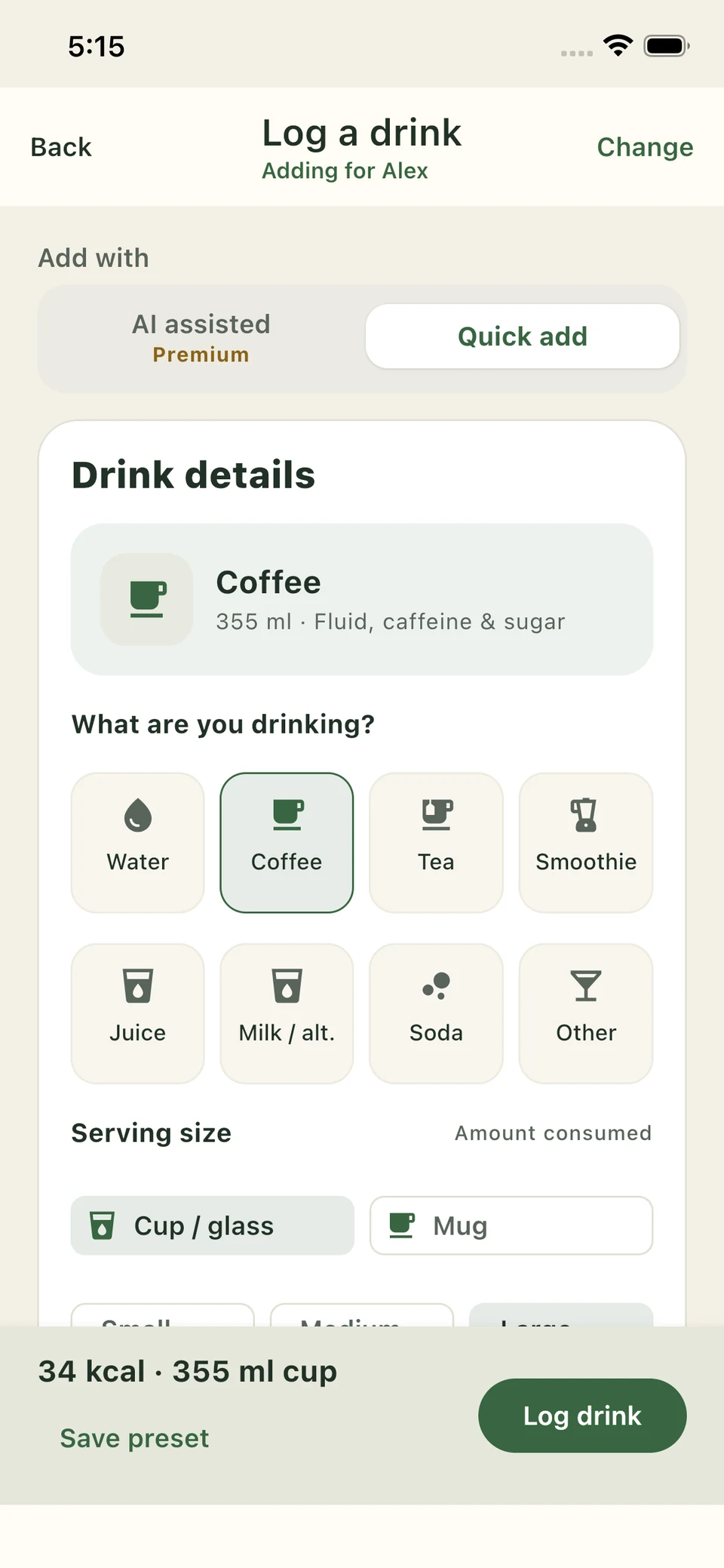
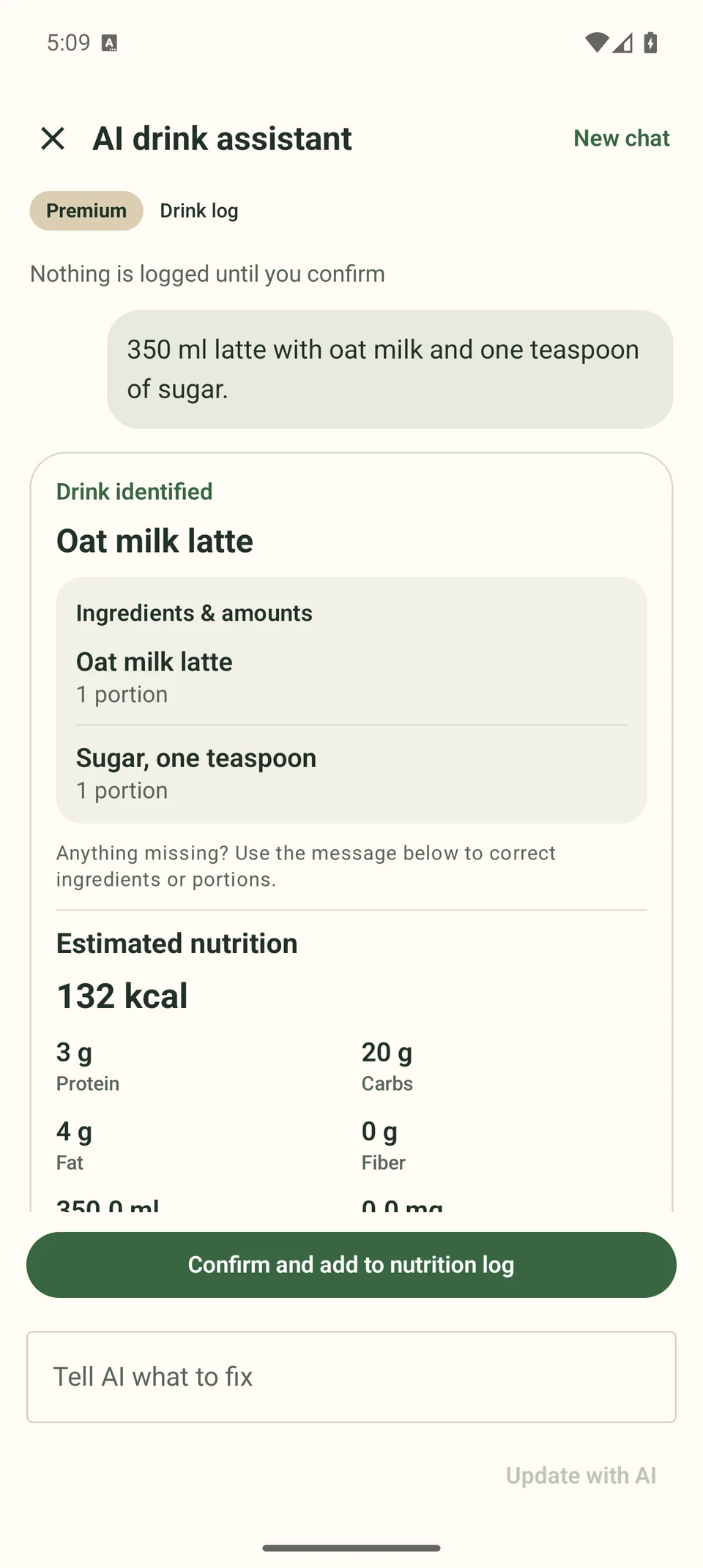
Log a drink from Home with Quick add, or choose Premium AI assisted logging and describe it by typing or supported voice input. Review the amount and additions before logging.
Pick the drink and container, then check the amount, milk and sugar. Quick add is available without Premium AI.
“350 ml latte with oat milk and one teaspoon of sugar.” Check the estimated ingredients and nutrition, then confirm.
Choose your level of kitchen help
Free, Pro and Premium share the same food journey. Pick the tools that fit your routine.
The everyday essentials.
Everything in Free, plus more control.
Everything in Pro, plus AI kitchen help.
Availability varies by plan and platform. Review the current plan details in the app. Household features are not part of the initial release.
Good to know
Here is what to expect from the app and early access.
It is designed for vegetarian, vegan and meat-free eating. Shape your meal choices around your dietary preferences, goals and the ingredients you have.
Premium includes Pro features plus Product Scan, Ask Herb AI Assistant, meal and pantry photo analysis, typed or supported voice descriptions for food and drinks, personalized meal plans and recipe ideas, vegetarian recipe conversion, ingredient swaps and recipe remix. Free includes limited recipe captures and imports; Pro includes unlimited captures and imports. Availability varies by plan and platform. You review proposed changes before saving.
Yes, with Premium. Capture or import a recipe, then review AI suggestions for replacing meat and seafood. Choose your swaps and review the updated ingredients, amounts and cooking steps before saving your vegetarian version. Available swaps and readable recipe data can vary.
Product Scan is a Premium feature. Scan a packaged product’s barcode or enter it to review available nutrition, ingredients and a product rating when enough data exists. Dietary checks include vegetarian, vegan, Jain and other supported preferences, with an ingredient reason for a conflict or uncertainty. Check the current package label: these checks are not certification, an allergy check or a cross-contact guarantee.
Yes, with Premium. Take a photo or choose one from your library, review the detected ingredient names and estimated quantities, then add the selected items to Pantry. You can edit or leave out a suggestion before adding it.
Ask Herb AI Assistant is your Premium kitchen assistant. Ask about your nutrition, describe a meal, find recipes on the web or get help adapting a recipe. Uploaded meal photos stay with their conversation. For a drink, open Log drink and use the AI assisted option to type or use supported voice input. Review and confirm changes before they are saved.
Ask Herb AI Assistant can search recipe websites and show matching results with their sources. Preview the chosen recipe, review ingredients and any swaps, then import it to your saved recipes. Publisher access and recipe readability can vary; nutrition may be estimated or unavailable.
We are preparing a US closed alpha on Android and iPhone together, followed by open beta and production. Join the list for an invitation when both platforms are ready. There is no confirmed launch date yet.
Not in the initial release. Shared household planning remains in development and will not be offered or billed until its account, privacy and synchronization checks are complete.
No. The Herb Kitchen is a meal-planning and nutrition-awareness tool, not a medical service. For medical nutrition advice, work with a qualified clinician. AI suggestions and nutrition estimates can be imperfect, so check ingredients, amounts and package labels.
The experience is designed around patterns and practical next steps. Your daily progress is not a grade. Use as much or as little tracking as feels helpful. It is not treatment for food anxiety or an eating disorder; if tracking increases distress, step away and seek support from a qualified professional.
Android and iPhone
Join early access while we prepare the first public release. We will share verified store listings when they open.
Until its public listing opens, choose your platform to join early access.